Contents
- Executive Summary
- Introduction
- Benefits of Transition
- Technical Overview
- Migration Strategy
- Security and Compliance
- Training and Support
- Contact Information
Executive Summary
Compucare Reports enables hospital administrators to create, run and schedule reports on patients, bookings, financial information and more. This white paper explores the benefits of migrating from an on-premises/Streets Heaver-hosted Report Generator implementation to Streets Heaver's Azure-hosted Report Generator "Software as a Service" (SaaS), now called Compucare Reports. It also provides technical information about the application's network topology, migration strategy and security.
Introduction
The legacy Report Generator was implemented in two ways: within a client’s infrastructure or in Streets Heaver’s data centre. It was deployed as a desktop application using Remote Desktop Protocol (RDP) or Citrix.
When deployed on-premises, clients had to allocate local resources to provision and maintain the infrastructure, which adds overhead for updates. When hosted in Streets Heaver’s data centre, updates were automated but limited by the need for named user registration, creating administrative bottlenecks.
The main challenges lie in staying up to date with updates and managing disaster recovery—whether on-premises or in Streets Heaver’s data centre. While clients seek to strengthen their disaster recovery strategies, the data centre setup cannot provide geo-redundancy.
Moving to a Microsoft Azure–hosted, Streets Heaver-managed solution addresses these issues. By leveraging Azure services and Microsoft Entra ID authentication, the new platform delivers an up-to-date, secure, and scalable foundation for the future of Streets Heaver’s solutions.
Compucare Reports combines the reporting power of the original application with the reliability and security of Azure and Entra ID.
Benefits of Transition
This section details some of the benefits of transitioning to Compucare Reports.
Enhanced Security
Compucare Reports is secured with Microsoft Entra and Compucare Authentication Services. Connections to the Compucare database are established with a read-only SQL login to ensure access is granted only to authorised users.
Streamlined User Access
User management is simplified with single sign-on and multi-factor authentication through Microsoft Entra ID. Once users are created within the Microsoft Entra ID tenant, they can be managed within the limits of the licence.
Continuous Deployment
The latest updates and features are deployed as they are made available.
Reduced Maintenance
All updates, backups and optimisations are centrally managed, reducing the burden on IT resources.
Resilience
Applications and data remain available during regional outages through geo-replication and distributed hosting.
Disaster Recovery
Data can be quickly restored in the event of failure through active replication and point-in-time backups.
Technical Overview
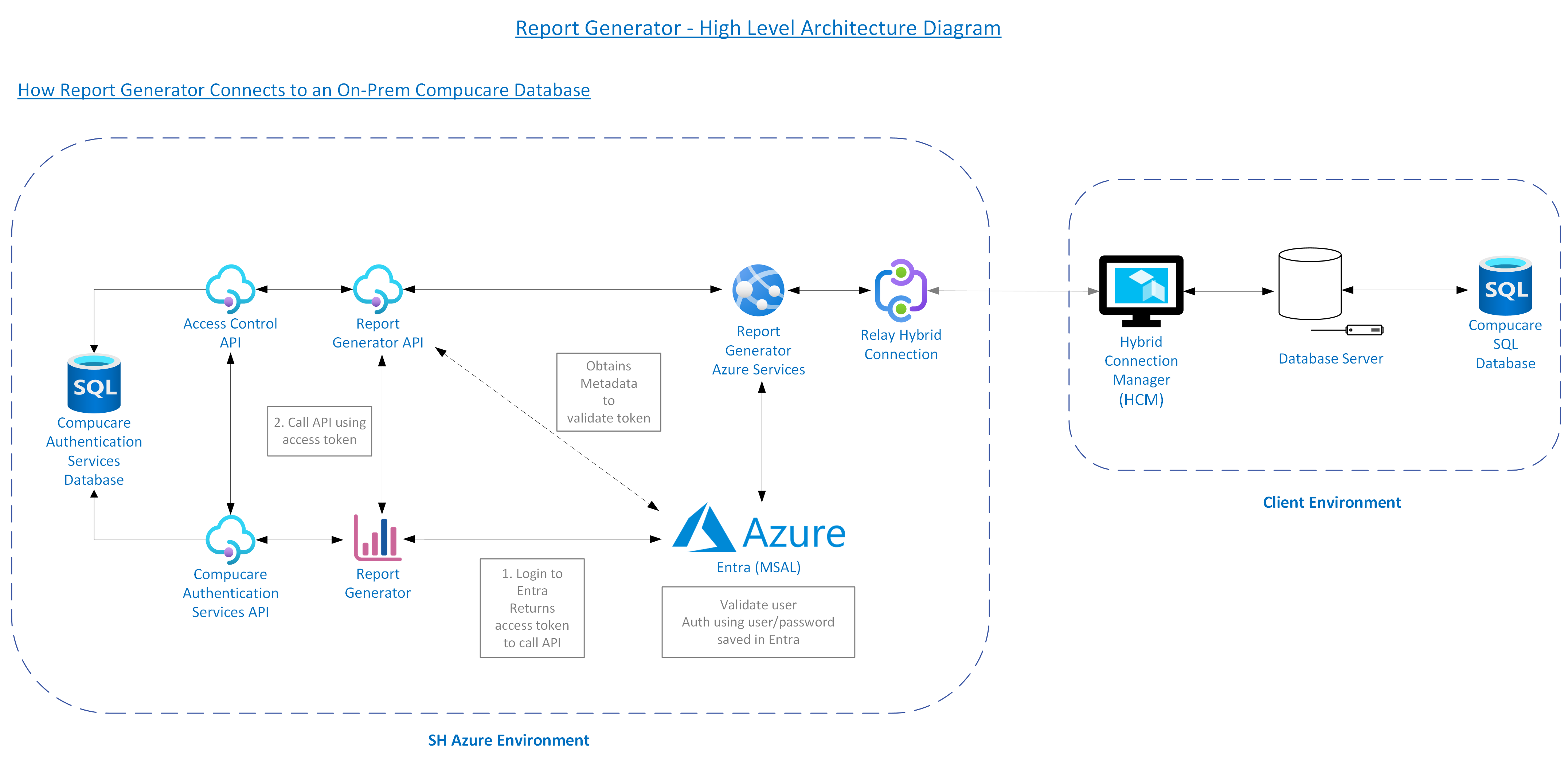
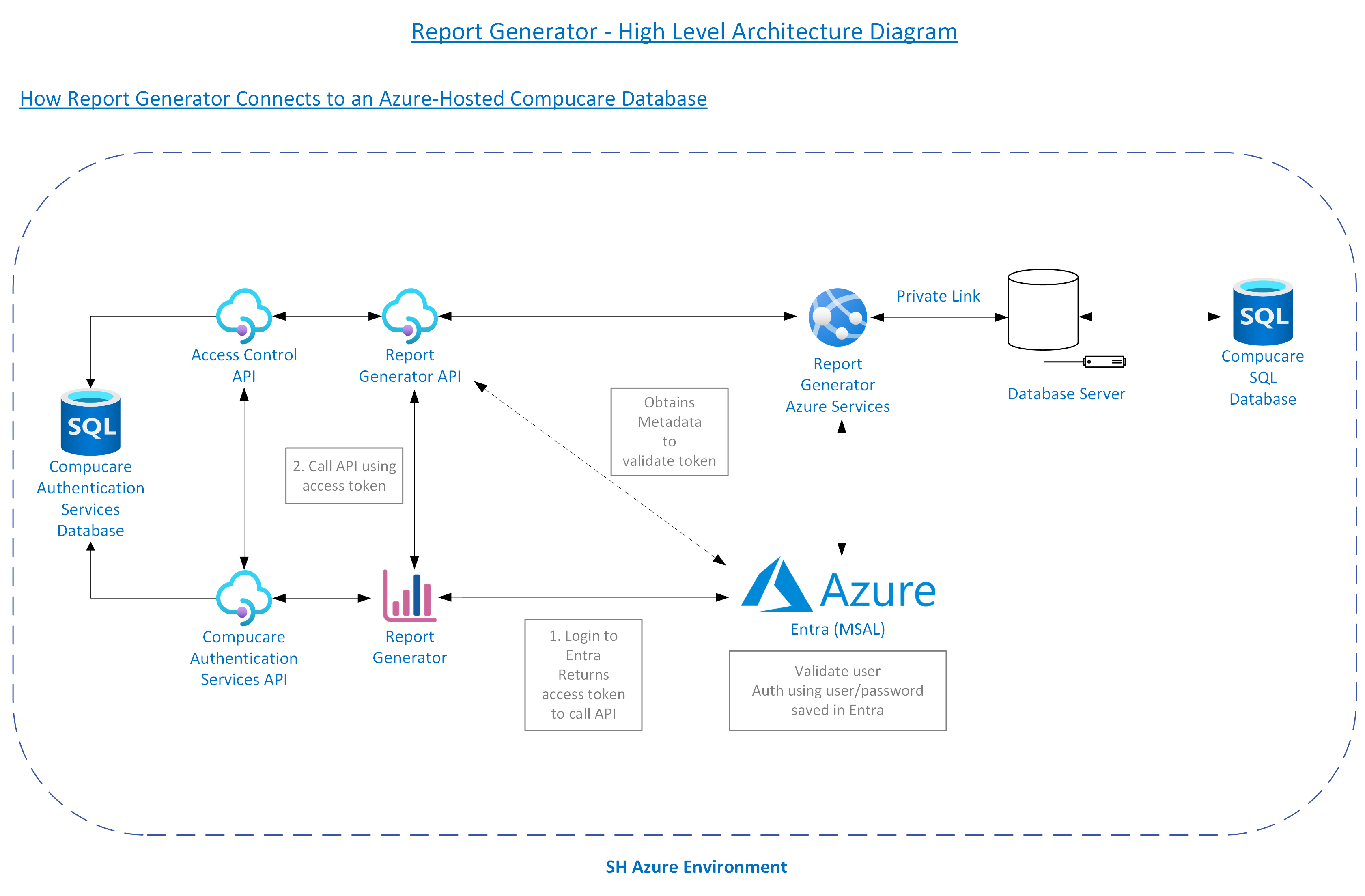
Compucare Reports exists within the Streets Heaver Azure Hosting Environment. If a Compucare database is hosted on-premises, it will use an Azure Hybrid Connection to connect to the Compucare Reports. If the database is hosted in Azure, no hybrid connection is required. Instead, Compucare Reports Azure Services connects to the Azure SQL Server using a private endpoint.
Typical Topology
The diagram below shows how Compucare Reports connects to an on-premises Compucare database.
The diagram below shows how Compucare Reports connects to an Azure-hosted Compucare database.
Tenant Permission and Claims
Compucare Reports uses Microsoft Graph permissions to manage user access and functionality. Delegated permissions (applies to logged-in users) include:
- People.Read
- Presence.ReadWrite (for presence indicator)
- User.Read
- User.ReadBasic.All
Application permissions (used for non-interactive applications) include User.Read.All, which retrieves the user's name from the authentication token. Internal scopes, such as RepGen.User are also applied.
Migration Strategy
This section provides an example of a typical migration process.
Assessing Your Current Implementation
Streets Heaver would perform a full survey of your existing setup, along with any connected services and build an implementation plan. If you are already a Streets Heaver Datacentre client, the transition is much simpler.
Simplified Migration Example
This is an example of the process required to migrate from the legacy Report Generator to Compucare Reports. This would be achieved with the help of your Streets Heaver Project Manager.
Prerequisites: Compucare 7 clients must be migrated to Compucare 8 and the legacy Report Generator.
- Register Tenant ID with Streets Heaver for Compucare Reports.
- For on-premises installations of Compucare Reports, set up a Hybrid Connection.
- Set up data sources for each Compucare database.
- Convert existing legacy Report Generator reports.
- Sign off.
Testing and Validation
There will be a degree of professional services expected to align expectations and timescales in collaboration between Streets Heaver implementation teams.
Once signed off, the legacy Report Generator will be uninstalled and the database will be removed.
Security and Compliance
Authentication and Authorisation
- All authentication takes place outside of Compucare Reports itself and is handled by Microsoft Entra and Compucare Authentication Services.
- Compucare Authentication Services ensures users can only access groups and data sources for which they have explicit permissions.
Data Protection and Encryption
- Encryption at Rest: The application's data stored in Azure CosmosDB is encrypted at rest.
- MS Entra ID (formerly Azure AD) Authentication: Access to the application is restricted to authenticated users via MS Entra ID.
- Multi-factor authentication (MFA) is enforced via the client's tenant configuration within Microsoft Entra ID.
- The enterprise application will need to be approved. Assigned Access can be enabled, and then the users and groups are restricted to the application.
- Azure Front Door: All web applications are fronted by Azure Front Door, which serves as a secure entry point for web traffic, offering several security benefits.
Secure and Resilient Hosting Environment
- Static Web Apps: Globally distributed Azure Static Web Apps for our application's front end.
- Geo-Replicated and Load Balanced APIs: Compucare Reports benefits from redundancy and failover capabilities. Architecture is replicated in the UK South and UK West regions to provide load balancing and resilience.
Data Access and Querying
The application queries Compucare databases, either Azure SQL Databases or on-premises SQL databases via Azure Hybrid Connections.
- Azure SQL Databases: Queries to Azure SQL Compucare databases use secure connection protocols TLS 1.2 to ensure that data in transit is encrypted.
- On-Premises SQL Databases via Azure Hybrid Connections: The application's interaction with on-premises SQL databases is facilitated through Azure Hybrid Connections. This allows the application to access on-premises resources without exposing the internal network to the public internet.
Compliance and Auditing
- Data Storage and Handling: All data, including but not limited to report configuration and stored reports, is stored within UK-only regions in Azure Cosmos DB, and has built-in 90-day retention policies for clearing up stored reports.
- Logging and Monitoring: The application's activities are logged and monitored to identify and respond to potential security incidents. This allows all report executions and run queries to be audited.
- Regular Security Audits: The application undergoes annual external CREST-approved penetration testing, as well as regular vulnerability audits to assess its security posture and identify vulnerabilities. Any findings are promptly addressed to maintain a robust security posture. Internal and external reports are available upon request.
Training and Support
To help users familiarise themselves with Compucare Reports, Streets Heaver provides personalised training via remote sessions, which is usually included in the project costs of the system setup.
Further guidance can also be found through quarterly release webinars and detailed product "lunchtime webinars" available via the Streets Heaver YouTube channel.
Additionally, the Streets Heaver Knowledge Base is regularly updated with tutorials and how-to guides. Visit the Compucare Reports section of the Knowledge Base (login required) for the latest updates and support materials.
Streets Heaver can provide support in Compucare Reports in the following ways:
- Guest Users:
- The client invites the Streets Heaver Support team into their Azure tenant as guest users.
- These users are then added via the Client Console.
- Shared Credentials:
- The client sets up one (or multiple) Streets Heaver users in their tenant and shares the credentials with Streets Heaver.
- These users are then added to Compucare Reports via the Client Console.
- Remote Support:
- Our support teams provide remote assistance through calling and screen sharing.
Contact Information
Please contact the Streets Heaver Commercials team at marketing@streets-heaver.com.
Was this article helpful?
That’s Great!
Thank you for your feedback
Sorry! We couldn't be helpful
Thank you for your feedback
Feedback sent
We appreciate your effort and will try to fix the article