Contents
- Executive Summary
- Introduction
- Technical Overview
- Clinical Risk Management
- Key Hosting Benefits
- Prerequisites
- Security and Compliance
- Training and Support
- Contact Information
Executive Summary
This white paper provides a technical overview of the latest release of MyPen. It details the platform enhancements introduced to strengthen infrastructure resilience, user authentication, and regulatory compliance. While core functionality remains consistent with the previous version, the updated platform is now hosted on Microsoft Azure, delivering improved security and data availability.
Authentication has been migrated to Microsoft Entra ID, enabling secure user management, Single Sign-On (SSO) and multi-factor authentication (MFA).
Additionally, the latest version of MyPen is now fully compliant with accessibility guidelines and standards, improving usability for all users.
These enhancements provide a more secure, scalable and resilient framework to support the established functionality, integration and efficiency users have come to expect from MyPen.
Introduction
Effective stoma care relies on accurate, comprehensive record management and coordinated workflows that span referrals, admissions, and follow-up. Stoma and Colorectal Care specialists require systems that support this full care pathway. However, legacy tools often depend on fragmented data entry processes or outdated infrastructure that no longer meet current security or accessibility standards. These limitations can reduce operational efficiency and affect the consistency of patient care.
This white paper introduces the latest version of MyPen, a web-based application used for stoma care patient management. The core functionality remains consistent with the previous version, ensuring continuity for existing users. However, the underlying platform has undergone a major technical update. Hosted on Microsoft Azure, the new version of MyPen benefits from enhanced security features, such as requiring all users to be authorised via Entra ID (see the Security and Compliance section of this white paper for more information).
The latest version of MyPen combines the efficiency and flexibility of earlier releases with the reliability and security of Azure and Entra ID. This modernised platform enables clinical and administrative staff to maintain high standards of care without the constraints of older systems.
Technical Overview
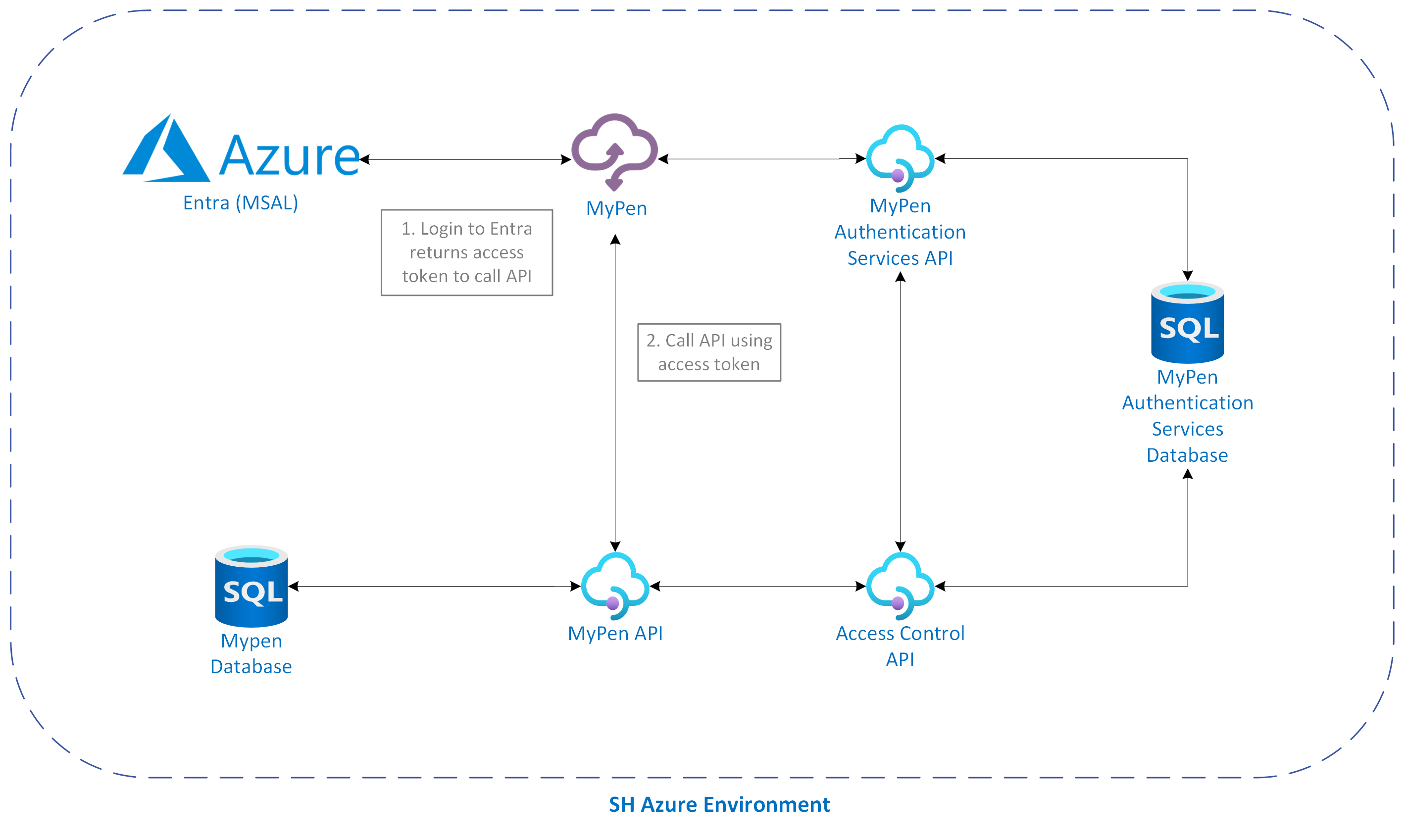
MyPen is hosted on Microsoft Azure and connects exclusively to Azure-hosted MyPen databases. This focus on cloud integration enables the app to benefit from improved performance, reliability, automatic updates and reduced maintenance overheads. This version of MyPen is internet-facing, as opposed to the previous version, which connected to the Health and Social Care Network (HSCN).
Typical Topology
The diagram below shows how MyPen connects to Microsoft Azure.
Testing and Validation
The following testing and quality assurance checks are performed on MyPen:
- Unit Testing: Each component of MyPen is tested to ensure it works correctly.
- Integration Testing: MyPen is tested after integrating new components to verify that all elements work together seamlessly.
- User Acceptance Testing (UAT): Testing is performed with end users to confirm that the system meets their needs.
- Security Testing: Regular penetration testing and security audits are performed to assess the product's security and identify any vulnerabilities. See the Security and Compliance section of this white paper for more information.
- Final Validation: A final check is performed to confirm all tests are successful and MyPen is ready for deployment.
Integration
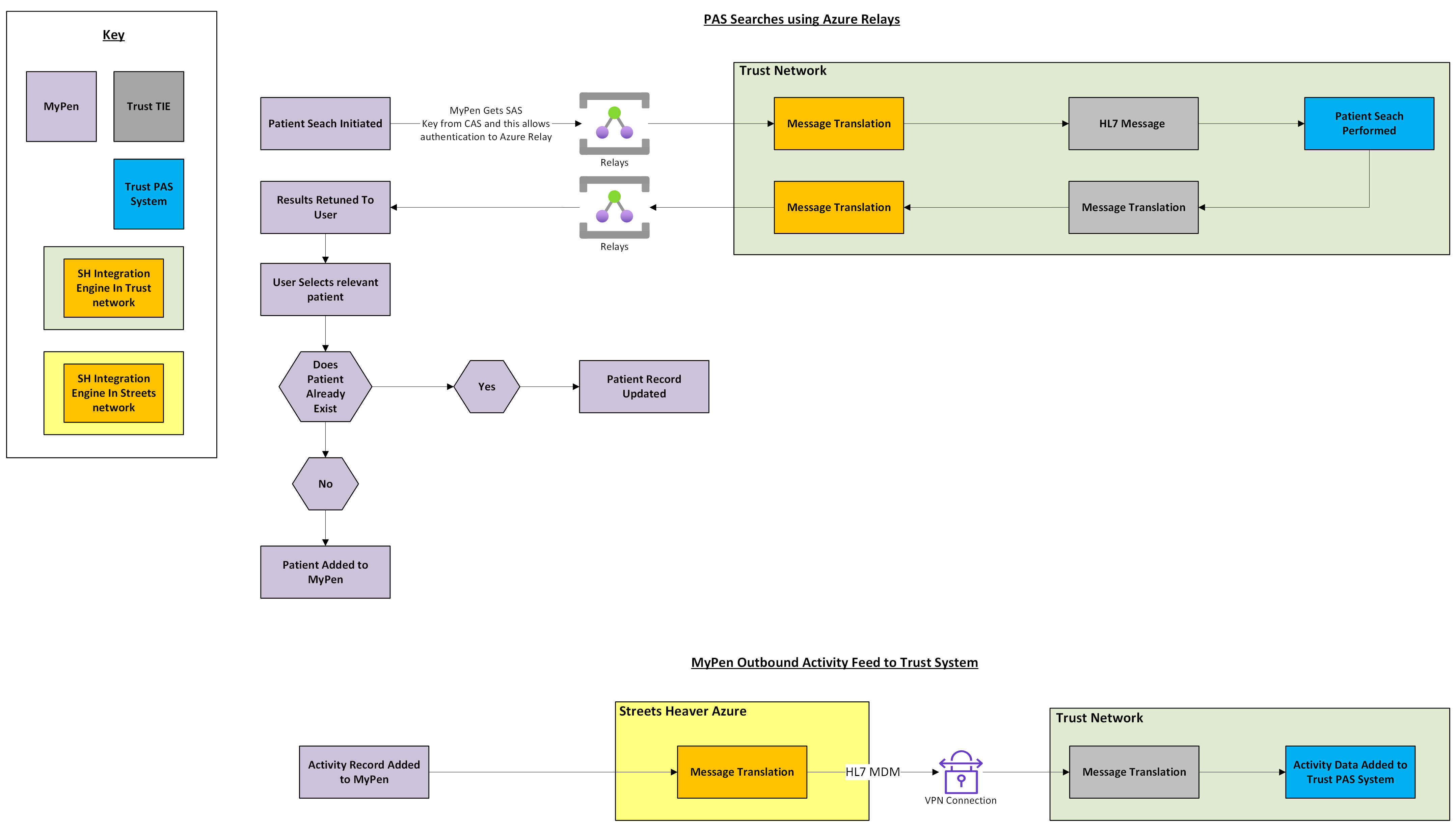
MyPen performs Patient Administration System (PAS) searches using ADT A19 or HL7 Query By Parameter. Therefore, it can integrate with any third-party system that supports these standards. Data is authenticated via Azure Relay before it is allowed into the Trust network.
MyPen sends outbound activity data to PAS systems as HL7 MDM to ensure the accuracy of the main PAS system's EPR. This uses MessageCall to translate the data, then sends it through a VPN connection to the Trust Integration Engine, which passes it to the PAS.
Clinical Risk Management
Effective clinical risk management is crucial to ensure that MyPen is a safe and reliable product that benefits both clinicians and patients.
Clinical risks are evaluated in accordance with the DCB0129 and DCB160 standards for clinical risk management. Following this specification allows for a repeatable and robust risk management process. You can read more about this standard on the NHS Digital website.
Streets Heaver monitors the performance and stability of MyPen. Any errors are automatically reported to the Engineering team. See Security, Monitoring and Alerting of Azure Apps for more information.
Key Hosting Benefits
This section details some of the benefits of the latest version of MyPen.
Enhanced Security
MyPen is secured with Microsoft Entra and MyPen Authentication Services. Connections to the MyPen database are established with a read-only SQL login to ensure access is granted only to authorised users.
Streamlined User Access
User management is simplified with single sign-on and multi-factor authentication through Microsoft Entra ID. Once users are created within the Microsoft Entra ID tenant, they can be managed within the limits of the licence.
Continuous Deployment
The latest updates and features are deployed as they are made available.
Reduced Maintenance
All updates, backups and optimisations are centrally managed, reducing the burden on IT resources.
Accessibility
MyPen is fully compliant with the Web Content Accessibility Guidelines (WCAG) 2.1 level AA and the Digital Technology Assessment Criteria (DTAC), ensuring all users can access it. See the Web Content Accessibility Statement for more information.
Prerequisites
Before MyPen is implemented, the following prerequisites must be met:
- You must have a Microsoft Entra ID account that can be enrolled on the MyPen tenant
- You must have a modern Internet browser to access MyPen
Security and Compliance
This section provides details on MyPen's security and compliance.
Authentication and Authorisation
Microsoft Entra and MyPen Authentication Services handle all authentication. MyPen Authentication Services ensures that users can access only groups and data sources for which they have explicit permissions.
Data Protection and Encryption
- Encryption in Transit: The application queries MyPen SQL databases hosted on Azure. All queries use secure connection protocols TLS 1.2, to ensure that data in transit is encrypted.
- Microsoft Entra ID Authentication: Access to MyPen is restricted to authenticated users via Entra ID.
- Multi-factor authentication (MFA) is enforced via the client's tenant configuration within Entra ID.
- The enterprise application will need approval. Assigned Access can be enabled, and then the users and groups are restricted to the application.
- Azure Front Door: All web applications are fronted by Azure Front Door, which serves as a secure entry point for web traffic, offering several security benefits.
- Azure API Management: All MyPen APIs are managed through Azure API Management, allowing for varying rate limiting of endpoints based on sensitivity.
Secure and Resilient Hosting Environment
- Azure Static Web Apps: MyPen utilises Azure's global distribution network to host the application's front end, ensuring efficient delivery and improved performance for users worldwide.
- Geo-Replicated and Load Balanced APIs: MyPen benefits from redundancy and failover capabilities. Architecture is replicated in the UK South and UK West regions to provide load balancing and resilience.
Compliance and Auditing
- Data Storage and Handling: All data, including patient data and clinical availability, is stored and accessed through MyPen.
- Logging and Monitoring: The application's activities are logged and monitored in MyPen. This allows auditing capabilities for changes made by the application. Additional logging uses Application Insights to identify and respond to potential security incidents.
- Regular Security Audits: The application undergoes annual external CREST-approved PEN testing and regular vulnerability audits to assess its security and identify vulnerabilities. Any findings are promptly addressed to maintain a robust security posture. Internal and external reports are available upon request. Additional PEN testing is performed for new features, scoped to the changes made for the feature.
Disaster Recovery
Training and Support
To help new users familiarise themselves with MyPen, Streets Heaver provides personalised training via remote sessions, which is usually included in the project costs of the system setup. If you wish to receive this training, please contact your Hollister Partnership Manager.
Additionally, the Streets Heaver Knowledge Base is regularly updated with tutorials and how-to guides. Visit the MyPen (on Azure) section of the Knowledge Base (login required) for the latest updates and support materials.
Contact Information
For enquiries, please contact the Streets Heaver Commercials team at marketing@streets-heaver.com.
For technical support, please contact the Streets Heaver Support team at support@streets-heaver.com or call 01522 872000.
Was this article helpful?
That’s Great!
Thank you for your feedback
Sorry! We couldn't be helpful
Thank you for your feedback
Feedback sent
We appreciate your effort and will try to fix the article